
How To Enroll
Ready to get started? Follow these 2 easy steps to become part of Kids Corner Early Learning Academy.
Apply For 3 Year Old Kindergarten
7:30am – 2pm only
Must be fully potty trained
Kids Corner Academy Early Learning Center Enrollment Instructions
Thank you for choosing Kids Corner Academy Early Learning Center. Please complete your child’s enrollment using one of the two options below.
2026 2027 CCC CHILD CHECKLIST
OPTION 1 — Complete the Electronic E‑Sign Application (Recommended)
Click the link below to fill out and sign the application electronically:
https://app.opensignlabs.com/publicsign?templateid=VVxGkHzc01
- No printing required
- No downloading required
- You can complete everything online, including signatures
OPTION 2 — Download, Save, and Complete the Application Using Adobe Acrobat
If you prefer to fill out the application manually, follow these steps carefully:
- Click the link below to open the application in your web browser: Click Here to 2026-2027 Download CCC Checklist.
- Immediately download and save the application to your computer. Do not fill out the form inside your browser.
- If you do not already have Adobe Acrobat Reader, download the free version here: https://get.adobe.com/reader/
- Open the saved application file using Adobe Acrobat Reader (not your browser).
- Fill out the entire application, including all signature fields.
- Save the completed application.
- Email the saved file to: conniemwilliams@aol.com
*IMPORTANT — PLEASE READ
Do NOT fill out or sign the application in your web browser. If the form is opened in a browser window, the signature fields will not work, and your application will be incomplete.
Apply for 4 Year Old Kindergarten Plus Free After School Care
If applying for any 4-5 Year Old Kindergarten Program. you need to complete the First Steps application for the year you are applying for along with a CCC Child Checklist.
FIRST STEPS APPLICATION
Kids Corner Academy Early Learning Center Enrollment Instructions
Thank you for choosing Kids Corner Academy Early Learning Center. Please complete your child’s enrollment using one of the two options below.
2026 2027 CCC CHILD CHECKLIST
OPTION 1 — Complete the Electronic E‑Sign Application (Recommended)
Click the link below to fill out and sign the application electronically:
https://app.opensignlabs.com/publicsign?templateid=VVxGkHzc01
- No printing required
- No downloading required
- You can complete everything online, including signatures
OPTION 2 — Download, Save, and Complete the Application Using Adobe Acrobat
If you prefer to fill out the application manually, follow these steps carefully:
- Click the link below to open the application in your web browser: Click Here to 2026-2027 Download CCC Checklist.
- Immediately download and save the application to your computer. Do not fill out the form inside your browser.
- If you do not already have Adobe Acrobat Reader, download the free version here: https://get.adobe.com/reader/
- Open the saved application file using Adobe Acrobat Reader (not your browser).
- Fill out the entire application, including all signature fields.
- Save the completed application.
- Email the saved file to: conniemwilliams@aol.com
* IMPORTANT — PLEASE READ
Do NOT fill out or sign the application in your web browser. If the form is opened in a browser window, the signature fields will not work, and your application will be incomplete.
After School Students Ages 5 – 10
If applying for any 5-10 Year After School Program. you need to complete the CCC Child Checklist.
Kids Corner Academy Early Learning Center Enrollment Instructions
Thank you for choosing Kids Corner Academy Early Learning Center. Please complete your child’s enrollment using one of the two options below.
2026 2027 CCC CHILD CHECKLIST
OPTION 1 — Complete the Electronic E‑Sign Application (Recommended)
Click the link below to fill out and sign the application electronically:
https://app.opensignlabs.com/publicsign?templateid=VVxGkHzc01
- No printing required
- No downloading required
- You can complete everything online, including signatures
OPTION 2 — Download, Save, and Complete the Application Using Adobe Acrobat
If you prefer to fill out the application manually, follow these steps carefully:
- Click the link below to open the application in your web browser: Click Here to 2026-2027 Download CCC Checklist.
- Immediately download and save the application to your computer. Do not fill out the form inside your browser.
- If you do not already have Adobe Acrobat Reader, download the free version here: https://get.adobe.com/reader/
- Open the saved application file using Adobe Acrobat Reader (not your browser).
- Fill out the entire application, including all signature fields.
- Save the completed application.
- Email the saved file to: conniemwilliams@aol.com
*IMPORTANT — PLEASE READ
Do NOT fill out or sign the application in your web browser. If the form is opened in a browser window, the signature fields will not work, and your application will be incomplete.
Connection Card
Click Here to Download Connection Card. Email completed form to conniemwilliams@aol.com
Please click here to install Adobe Acrobat Reader to view and fill out applications.
4 Year Old Kindergarten Transfer Form
If you would like to transfer to our 4-5 year old program from a previous 4k program, please complete the Transfer Form, and a CCC Child File Checklist.
Please complete the Student Transfer Form
Click Here to Download Student Transfer Form. Email completed form to conniemwilliams@aol.com
Kids Corner Academy Early Learning Center Enrollment Instructions
Thank you for choosing Kids Corner Academy Early Learning Center. Please complete your child’s enrollment using one of the two options below.
2026 2027 CCC CHILD CHECKLIST
OPTION 1 — Complete the Electronic E‑Sign Application (Recommended)
Click the link below to fill out and sign the application electronically:
https://app.opensignlabs.com/publicsign?templateid=VVxGkHzc01
- No printing required
- No downloading required
- You can complete everything online, including signatures
OPTION 2 — Download, Save, and Complete the Application Using Adobe Acrobat
If you prefer to fill out the application manually, follow these steps carefully:
- Click the link below to open the application in your web browser: Click Here to 2026-2027 Download CCC Checklist.
- Immediately download and save the application to your computer. Do not fill out the form inside your browser.
- If you do not already have Adobe Acrobat Reader, download the free version here: https://get.adobe.com/reader/
- Open the saved application file using Adobe Acrobat Reader (not your browser).
- Fill out the entire application, including all signature fields.
- Save the completed application.
- Email the saved file to: conniemwilliams@aol.com
*IMPORTANT — PLEASE READ
Do NOT fill out or sign the application in your web browser. If the form is opened in a browser window, the signature fields will not work, and your application will be incomplete.
Connection Card
Click Here to Download Connection Card. Email completed form to conniemwilliams@aol.com
Please click here to install Adobe Acrobat Reader to view and fill out applications.
Who is eligible for a child care voucher?
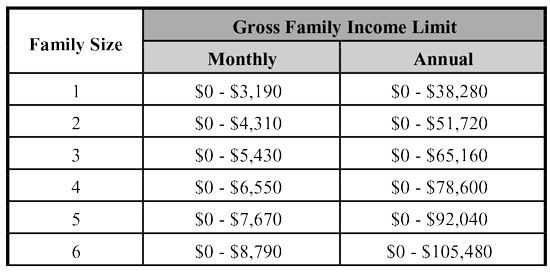
In order to qualify, you must meet the income guidelines listed below, be currently working 15 or more hours per week or in school/training, and have a child(ren) between 0 and 12 years of age. For two parent households, your spouse or partner must also be working 15 or more hours per week, in school/training, or have a verified disability.
Parent(s) or Guardian(s) gross income must be under 300% of the federal poverty level (see chart below). Gross income is the amount before taxes and other deductions come out.
Email completed form to conniemwilliams@aol.com